
Sale!
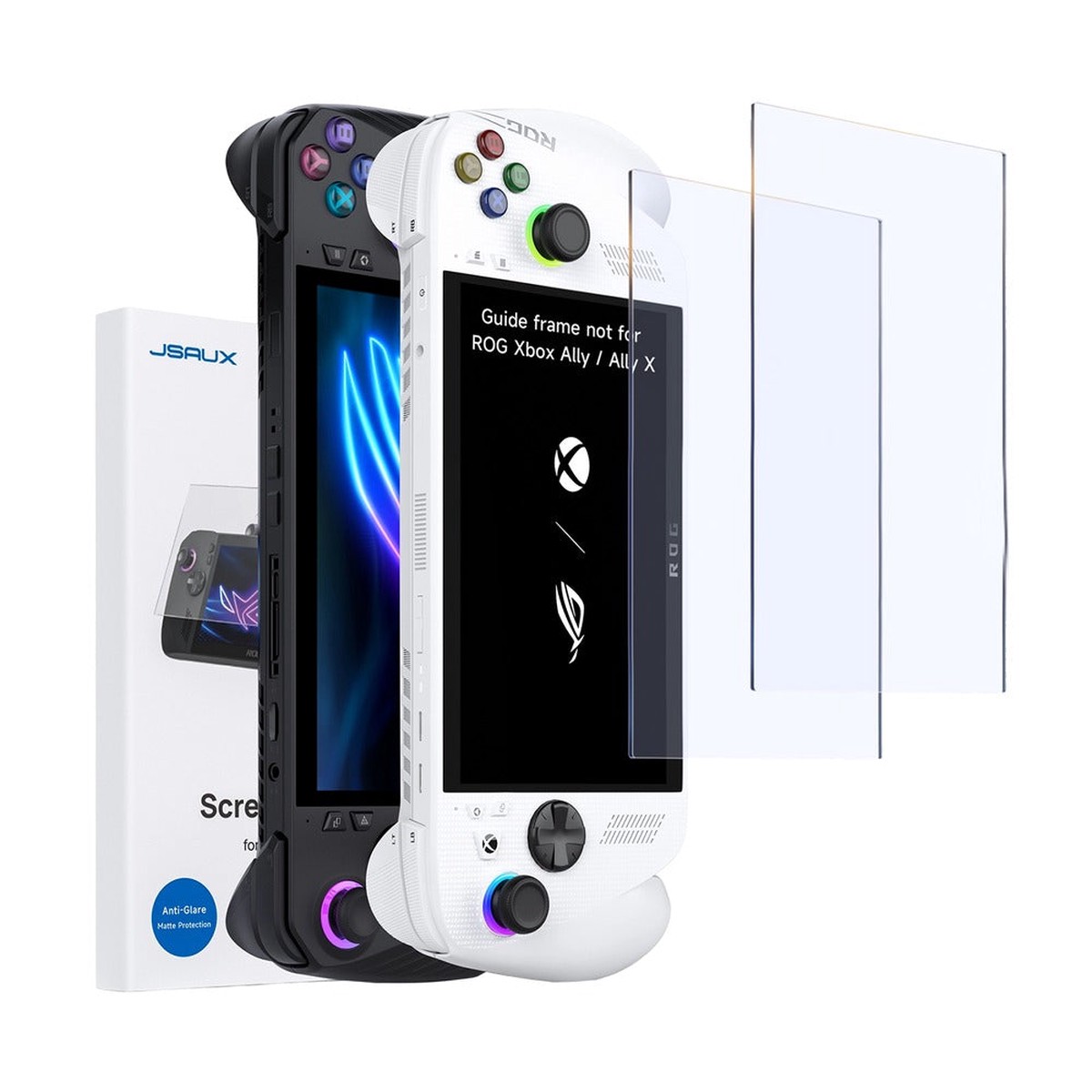
JSAUX Ultra Clear Anti-Glare Matte Tempered Glass Screen Protector 2-Pack for ROG Ally / ROG Ally X / ROG Xbox Ally / ROG Xbox Ally X (GP0113B)
Original price was: $19.88.$15.90Current price is: $15.90.
Description
JSAUX Ultra Clear Anti-Glare Matte Tempered Glass Screen Protector 2-Pack for ROG Ally / ROG Ally X / ROG Xbox Ally / ROG Xbox Ally X (GP0113B)
Protect your handheld gaming display with the JSAUX Ultra Clear Anti-Glare Matte Tempered Glass Screen Protector 2-Pack (GP0113B). Designed for the ASUS ROG Ally and ROG Xbox Ally series, this screen protector combines a matte anti-glare finish with durable tempered glass to help reduce reflections and protect against everyday scratches, fingerprints, and wear.
With 9H hardness, an ultra-thin 0.33mm profile, and a precision-fit design, it helps maintain touchscreen responsiveness while improving visual comfort in bright environments. The included alignment frame makes installation easier, helping you achieve accurate placement and a clean, bubble-free finish.
Key Features
-
Designed for ROG Ally Series: Compatible with ROG Ally, ROG Ally X, ROG Xbox Ally, and ROG Xbox Ally X (2025).
-
2-Pack Value: Includes two tempered glass screen protectors for replacement or backup.
-
Matte Anti-Glare Finish: Helps reduce reflections and glare for more comfortable gaming in bright indoor and outdoor environments.
-
9H Hardness Protection: Helps protect the display against scratches and everyday wear.
-
Ultra-Thin 0.33mm Design: Designed to preserve touchscreen sensitivity and responsive in-game controls.
-
Ultra-Clear Viewing: Balances glare reduction with screen clarity.
-
Precision Fit: Designed for accurate alignment and full-screen coverage on compatible handheld displays.
-
Easy Installation: Includes an alignment frame to simplify application and help reduce bubbles.
Specifications:
| Quantity | 2-Pack |
|---|---|
| Compatibility | ASUS ROG Ally (2023) ASUS ROG Ally X (2024) ASUS ROG Xbox Ally (2025) ASUS ROG Xbox Ally X (2025) Note: Guide frame not compatible with ROG Xbox Ally / Ally X or MSI Claw A1M. Manual alignment is easy. |
| Thickness | 0.31mm |
| Weight | 170g |
| Light transmittance | > 86% |
| Special Features | Anti-Glare |
| Product Dimensions | 164.6*105.8mm |
| Tempered film material | Medium aluminum glass, hardness 9H, with an anti-glare coating and ag micro-frosted anti-glare on the surface |
| Tips for Installation | 1. It is best to install the screen protector for ROG Ally in a clean, dust-free environment. 2. Please use wet wipes and dry wipes to clean the screen before you install it. |
You May Also Like

Original price was: $113.27.$56.64Current price is: $56.64.
Original price was: $13.51.$10.81Current price is: $10.81.
Original price was: $38.71.$30.97Current price is: $30.97.
Original price was: $60.92.$30.46Current price is: $30.46.

Original price was: $151.26.$75.63Current price is: $75.63.
Original price was: $76.69.$38.35Current price is: $38.35.
Reviews
There are no reviews yet.