
Sale!
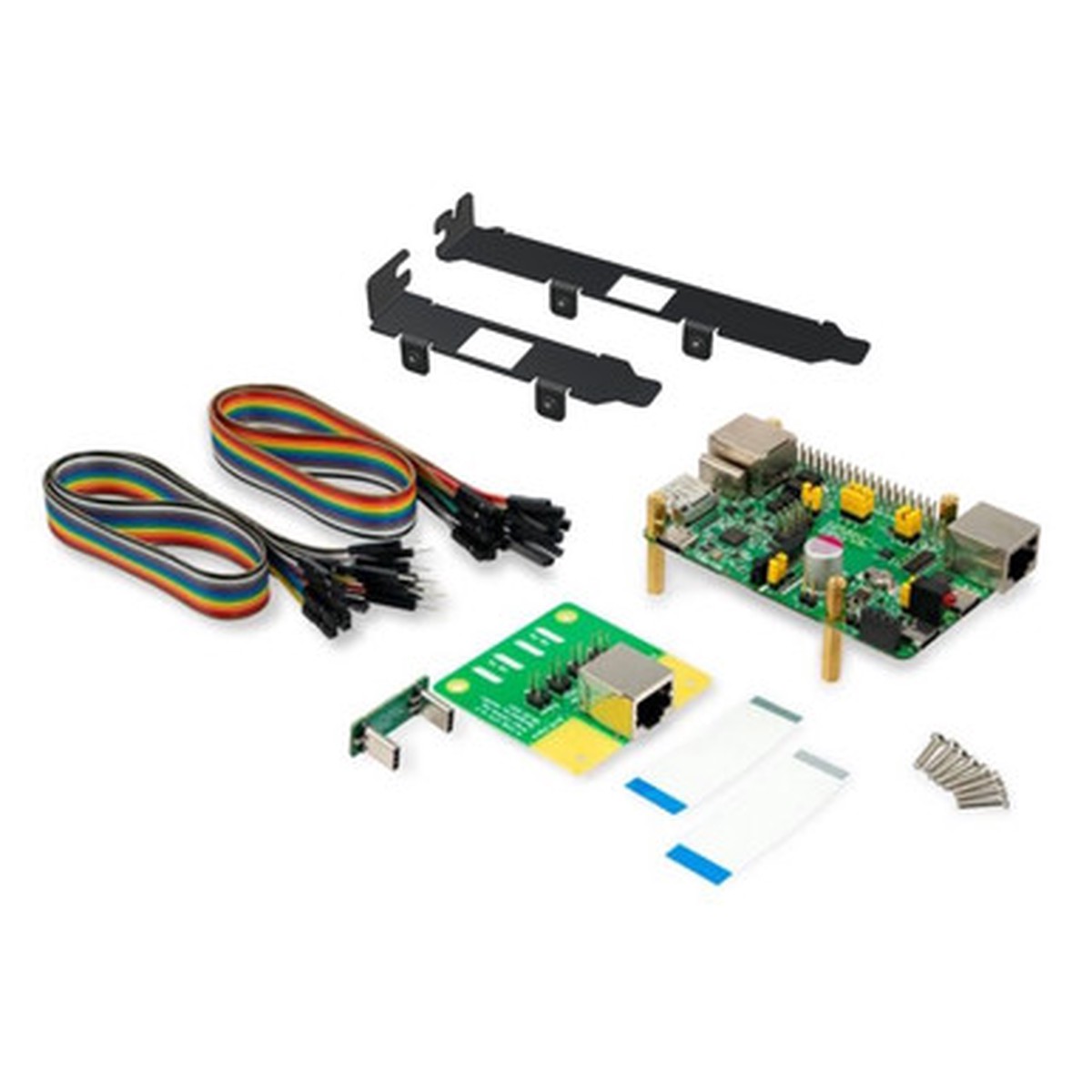
PiKVM v3.3 HAT for Raspberry Pi 4
Original price was: $169.95.$84.98Current price is: $84.98.
Description
Description Videos Show Reviews PiKVM V2 HAT – The Original DIY Remote Management Board The PiKVM HAT made it possible to build a fast remote management solution based on a Raspberry Pi board. If youre looking for PiKVM hardware, check out the newer generation. Looking for the latest PiKVM? Discover the PiKVM V4 Plus and PiKVM V4 Mini , both with faster HDMI capture, audio support, and improved design compared to V2. The PiKVM v3 HAT Board is designed to work with the Raspberry Pi 4 and provides the following features: HDMI capture device with max resolution 1080p 50Hz and audio support Keyboard & mouse emulation Mass storage emulation (i.e., virtual flash drive or CD drive provided by image file saved on PiKVM) Ability to simulate “removal and insertion” for USB for above mentioned devices ATX controller (allowing to switch power even if the target device is off or the operating system hangs) Onboard real-time clock 5v PWM fan controller USB & RJ-45 serial console Unsure which PiKVM model to choose? See our comparison chart Includes The PiKVM v3 HAT board USB-C bridge board ATX adapter board with brackets and motherboard interface wiring 2x Flat CSI-2 cables 7x jumpers, assorted colors 8x brass standoffs 8x screws Requirements To use PiKVM v3, you will need the following things, which are NOT included in the kit: Raspberry Pi 4 (any amount of RAM is OK) 5.1v 3A power supply with USB-C A regular HDMI cable USB-C to USB-A cable with DATA lines (for keyboard and mouse emulation) Straight Ethernet cable (NOT crossover, to connect the HAT board and ATX board) Micro-SD card at least 16 Gb and class 10 is strongly recommended Known issues & limitations The actual frame rate of the image received via HDMI will depend on the network bandwidth, resolution and the load on the Raspberry Pi. This is usually ~20-24 FPS for 1080p over LAN. AIMOS switches are not fully compatible with the video capture device (as with a regular HDMI CSI bridge). There may be compatibility issues with some motherboards (such as HP or DELL), which are the same as those that exist with Pi-KVM v2. Not everything is perfect, but if you have already used Pi-KVM v2 – our new v3 will work perfectly and please you. If there is no image from the BIOS, you can fine-tune the HDMI settings, but it is possible that the USB keyboard or Mass Storage devices will not be available in the BIOS. Important: USB-C display input is not supported. Resources NEW! Support Forum PiKVM v3 HAT user guide PiKVM on GitHub Videos Hide Videos Show Videos Pi-KVM – DIY CHEAP Raspberry Pi KVM over IP Prototype Version 3 Review! Checking out the DIY KVM over IP Prototype Version 3 from Pi-K… 1 Review Hide Reviews Show Reviews 5 Awesome product Posted by Josh on Nov 30th 2021 Nov 30th 2021 I have been using this for a few weeks now and it is really great. I got mine through the Kickstarter, but its the same kit. Really happy with it. Normally KVMs that are accessible remotely over IP cost $800+ to start with.
You May Also Like
Original price was: $17.95.$14.36Current price is: $14.36.

Original price was: $17.95.$14.36Current price is: $14.36.
Original price was: $38.00.$30.40Current price is: $30.40.
Original price was: $9.95.$7.96Current price is: $7.96.

Original price was: $76.95.$38.48Current price is: $38.48.

Original price was: $11.95.$9.56Current price is: $9.56.
Reviews
There are no reviews yet.