
Sale!
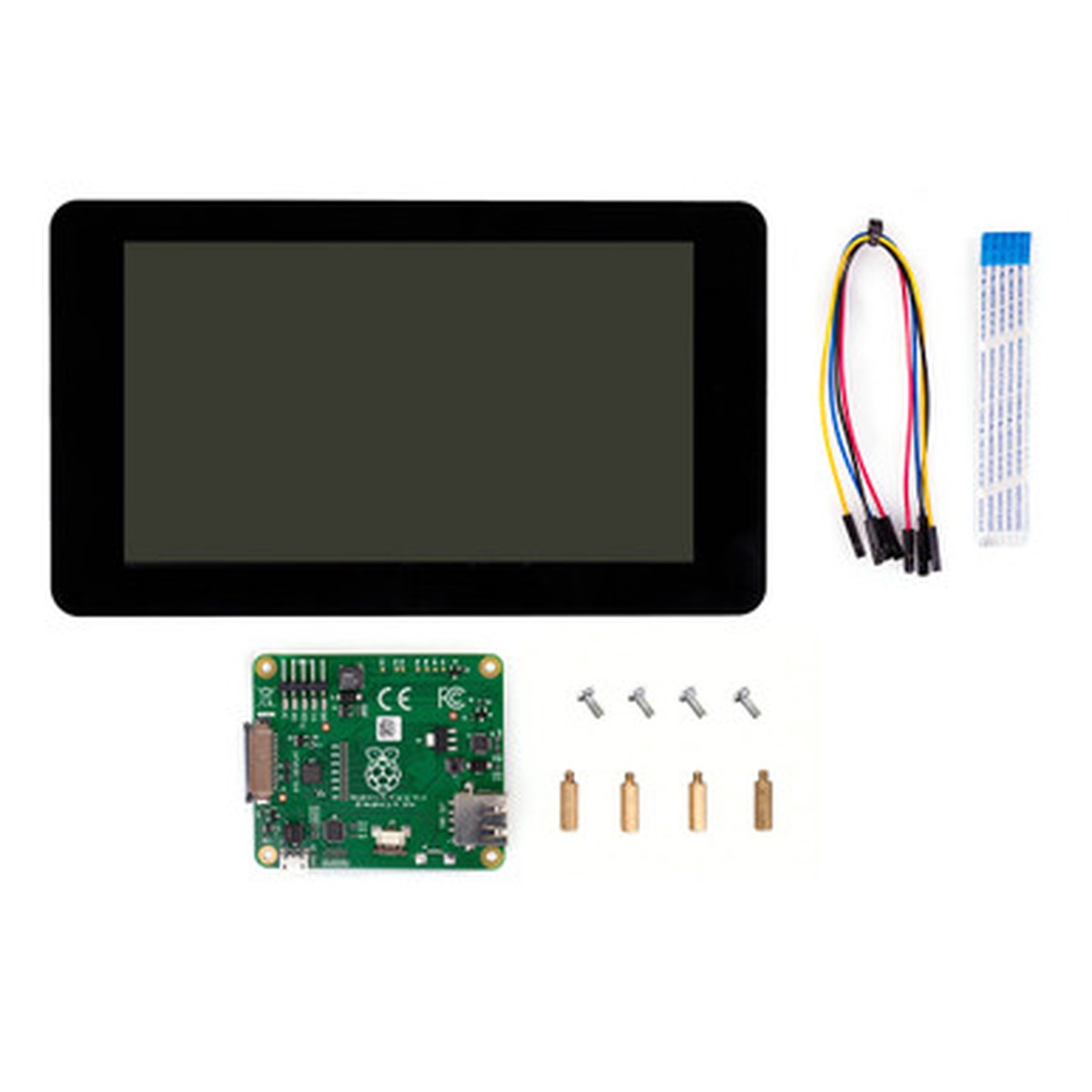
Raspberry Pi Touch Display
Original price was: $66.00.$33.00Current price is: $33.00.
Description
Description Show Reviews Raspberry Pi Touch Display – The official 7 touchscreen display for Raspberry Pi -SC1227 The Official Raspberry Pi 7 Touchscreen Display (800480) adds an interactive interface for your projects, from tablets to dashboards. It connects with just two cables, DSI ribbon and GPIO power, so no separate power supply is needed. Raspberry Pi OS includes drivers for ten-finger capacitive touch and an on-screen keyboard, letting you use your Pi without an external keyboard or mouse. Compatible with all Raspberry Pi boards except Raspberry Pi 400 and Zero. Looking for the newer version? See the Raspberry Pi Touch Display 2 with HD resolution, slim design, and native portrait mode. Features: Turn your Raspberry Pi into a touch screen tablet, infotainment system, or standalone device 10 finger capacitive touch Screen Dimensions: 194mm x 110mm x 20mm Viewable screen size: 155mm x 86mm Screen Resolution 800 x 480 pixels Applications: Consumer Electronics Embedded Design & Development Hobby & Education Multimedia Portable Devices Compatibility: All Raspberry Pis that have a DSI connector ( NOT the Pi Zero family, Pi400) Contents 7″ Touchscreen Display, Adapter Board, DSI Ribbon cable, 4 x Stand-offs and screws, 4 x Jumper wires The Raspberry Pi board and Power Supply are not included in this kit and should be purchased separately. Resources Raspberry Pi Touch Display documentation 2 Reviews Hide Reviews Show Reviews 3 The lower resolution shows Posted by Trevor on Mar 20th 2024 Mar 20th 2024 At 800 x 480 it is likely fine for a lot of basic tasks but as a display for my music streamer it is lacking. The album covers don’t look sharp at all. If you are anything off center on the viewing angle the image suffers noticeably. The subtle background image to the streamer display disappears if you aren’t dead center. Even on center the colors are a bit washed out but anything more than 30 degrees off angle and they go down hill fast.
You May Also Like

Original price was: $16.95.$13.56Current price is: $13.56.
Original price was: $267.00.$133.50Current price is: $133.50.
Original price was: $14.95.$11.96Current price is: $11.96.
Original price was: $62.85.$31.43Current price is: $31.43.
Original price was: $94.50.$47.25Current price is: $47.25.

Original price was: $20.95.$16.76Current price is: $16.76.
Reviews
There are no reviews yet.