
Sale!
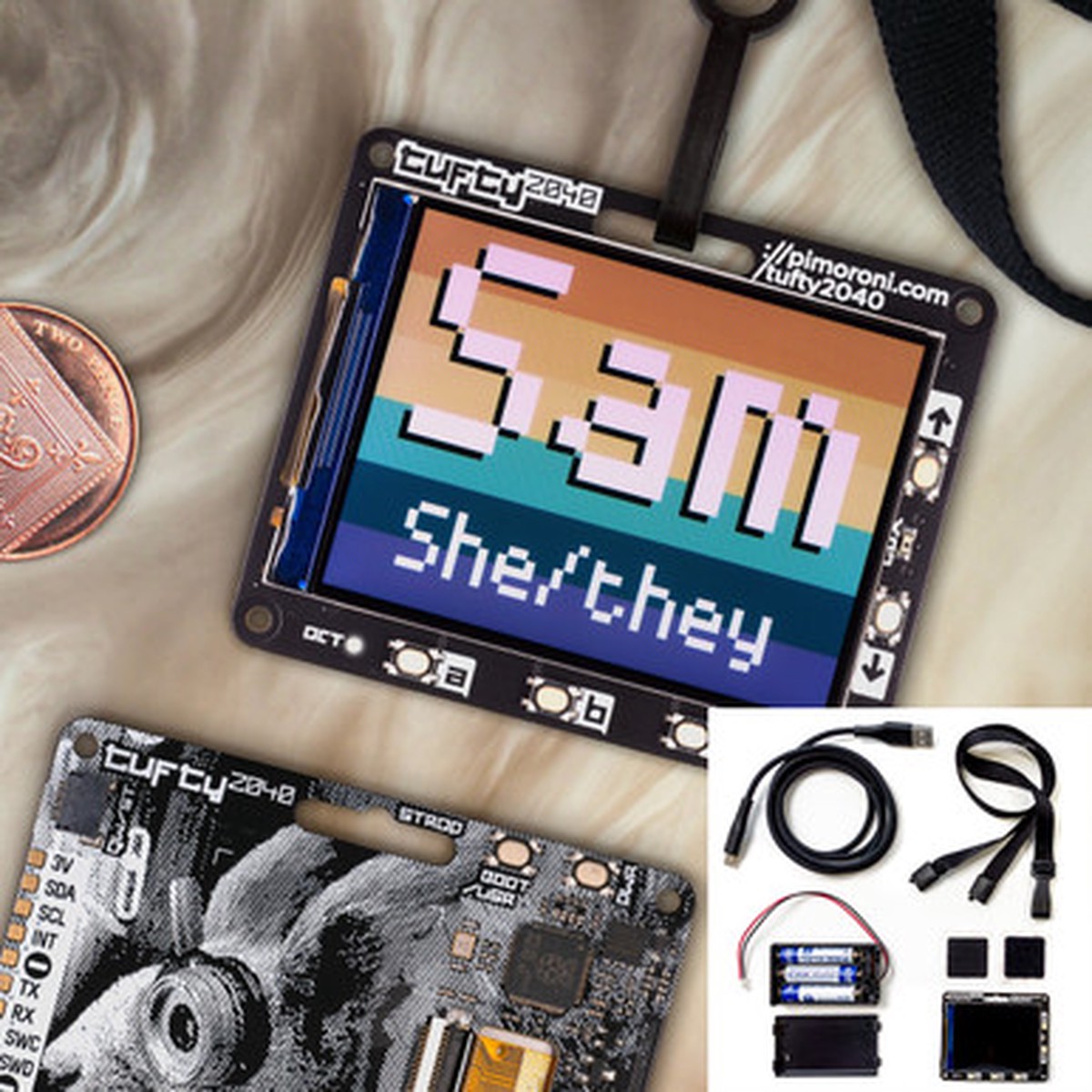
Tufty 2040 + Accessory Kit
Original price was: $34.95.$27.96Current price is: $27.96.
Description
Description Show Reviews A hackable, programmable badge with 2.4″ (320 x 240) TFT LCD colour display, powered by Raspberry Pi RP2040. Tufty comes fully loaded with a quintet of buttons so you can easily change what’s displayed on the screen, a slot so you can clip it onto a lanyard and a light sensing phototransistor, which can be used to adjust the brightness of the screen automatically. On the back, you’ll find a majestic cyberpunk squirrel, a battery connector (with a nice wide input voltage) and the usual RP2040 old chestnuts – boot and power on/off buttons and a Qw/ST connector for attaching breakouts. Features 2.4″ colour IPS LCD display (320 x 240 pixels) Driver IC: ST7789v Connected via parallel Dimmable backlight (adjustable via PWM) Powered by RP2040 (Dual Arm Cortex M0+ running at up to 133Mhz with 264kB of SRAM) 8MB of QSPI flash supporting XiP Phototransistor for light sensing Five front user buttons Power and boot buttons (the boot button can also be used as a user button) White LED USB-C connector for power and programming JST-PH connector for attaching a battery (input range 3V – 5.5V) High-precision voltage reference for battery level monitoring. Qw/ST (Qwiic/STEMMA QT) connector Fully-assembled (no soldering required) Schematic Dimensional drawing C++/MicroPython libraries Includes Tufty 2040 3 x AAA battery holder 3 x AAA batteries Velcro square Black lanyard (made from recycled plastic bottles!) USB-C to USB-A cable Software You can program Tufty with C/C++ or MicroPython. You’ll get best performance using C++, but if you’re a beginner we’d recommend using our batteries included MicroPython build for ease of getting started. We’ve preloaded Tufty with a demo reel of fun examples to show you what it can do! (Learn) Getting Started with Tufty 2040 Download Pirate brand MicroPython (you’ll need the special Tufty .uf2 C++ examples MicroPython examples PicoGraphics function reference The display functions in our new improved PicoGraphics library have been given a glow up – be sure to check them out! You can now: render JPEGs display QR codes draw weird polygonal shapes import sprites from a spritesheet use custom colour palettes (saving valuable RAM) Connecting Breakouts The Qw/ST connector on Tufty 2040 makes it super easy to connect up Qwiic or STEMMA QT breakouts. If your breakout has a QW/ST connector on board, you can plug it straight in with a JST-SH to JST-SH cable. Breakout Garden breakouts that don’t have a Qw/ST connector can be connected using a JST-SH to JST-SH cable plus a Qw/ST to Breakout Garden adaptor. List of breakouts currently compatible with our C++/MicroPython build. Notes Measurements: 65.2mm x 52.7mm x 9.6mm (L x W x H, including connectors). The mounting holes are M2 and 2.9mm in from each edge. The corner radius is 3mm. We’ve designed Tufty 2040 to be accommodating about input voltage (3V – 5.5V), so it’s possible to use a variety of different batteries and battery packs. We’d recommend using a 3x AAA battery pack which should give you maximum juice whilst still fitting behind Tufty nicely. A 2x AAA battery pack will only work well if you use non-rechargeable batteries – the voltage from 2 rechargeable (NiMH) batteries (2.4V) is just not enough for the screen. Tuftys are hungrier than Badgers! Power consumption is around 80mA for the screen (at full brightness) and 20mA for the RP2040 – so 100 mA total. Tufty has a toggle power on / off button (instead of a reset button) to make it easy to turn it off to preserve power, and setting the backlight to dim/turn off automatically will also make your batteries last much longer. Alternatively, you can plug a LiPo/LiIon battery into the battery connector, with the following caveats. Please only consider this if the person wearing the badge is an adult and knows what they’re doing with LiPos! A solid enclosure or backplate to protect the battery from damage whilst being worn is a very good idea (or you could use one of our Galleon hard case LiPo batteries). There’s no battery protection included on Tufty 2040, so you should only use it with LiPo batteries that include internal protection. Unlike some of our other boards, Tufty 2040 doesn’t have battery charging circuitry onboard. You’ll need an external LiPo charger to charge the battery (like a LiPo Amigo). Sciurus Cybernetics employees should be careful when eating their last nut, in order to avoid kernel panic. 0 Reviews Hide Reviews Show Reviews
You May Also Like

Original price was: $20.95.$16.76Current price is: $16.76.

Original price was: $100.00.$50.00Current price is: $50.00.

Original price was: $17.95.$14.36Current price is: $14.36.
Original price was: $66.00.$33.00Current price is: $33.00.
Original price was: $100.00.$50.00Current price is: $50.00.

Original price was: $20.95.$16.76Current price is: $16.76.
Reviews
There are no reviews yet.